

AI Overviews changed what the top of a Google search results page looks like, and your ads are already showing around them. You did not opt in, you cannot opt out, and there is no separate line in your reports telling you it happened.
This guide covers where ads appear, which campaign types and match types are eligible, which countries have ads inside the overview, what Google’s policy excludes, how your ad group prioritization changes on this surface, how reporting works, and what to actually change in your account.
Country lists, campaign eligibility and placement rules in this guide were verified against Google’s official documentation on 22 October 2026. Google changes this surface often, so check the About ads and AI Overviews help page for the current position.
What AI Overviews Are
AI Overviews are Google AI-generated answers at the top of the search results, built from a range of web pages and shown with links to the sources.
Google says they trigger on queries that generally have “no one right answer”, like complex questions or questions where it helps to pull information from several pages. That is the key thing to hold on to: AI Overviews sit on exploratory, messy, conversational searches, not on short transactional ones.
AI Overviews are available in more than 100 countries and Google’s ads documentation now refers to 200+ markets where AI Overviews appear.
Where Your Ads Can Appear in Google Search Results
There are two very different placements, and mixing them up is where most confusion starts.
Above the AI Overview: your normal top ad block. Live in all 200+ markets, all campaign types, any match type.
Inside the AI Overview: a Sponsored slot rendered within the answer itself. 12 countries, English only, text and Shopping ads, broad match or keywordless only.
Below the AI Overview: the bottom ad block, same rules as above the overview.
| Above and below the AI Overview | Inside the AI Overview | |
|---|---|---|
| Markets | All 200+ markets where AI Overviews run, EU included | 12 countries, English only, mobile and desktop |
| Campaign types | Search, Shopping, Performance Max, App | Search, Shopping, Performance Max |
| Ad formats | Text, Shopping, local, app | Text and Shopping only |
| Match types | Exact, phrase and broad all work | Broad match or keywordless only, exact match cannot serve |
| What Google matches on | The user’s query | The query and the content of the AI Overview |
| Sensitive verticals | Normal Google Ads policy | Adult, alcohol, gambling, finance, healthcare, politics and more excluded |
| Can you target it? | No | No |
| Can you opt out? | No | No |
| Reporting | Top Ads | Top Ads, no segmented reporting |
Ads above and below AI Overviews
- Eligible in all 200+ markets where AI Overviews are available.
- Ads serve through the existing auction ranking system and signals.
- Existing text, Shopping, local, or app ads from your Search, Shopping, Performance Max, and App campaigns are eligible.
This is the placement almost every advertiser outside the twelve English-language markets is dealing with. Functionally, it is your normal top and bottom ad blocks, now with an AI answer sitting between them.

Ads in AI Overviews
This is the genuinely new one. The ad renders inside the overview unit itself, in a clearly labeled Sponsored area, and Google considers both the user query and the content of the AI Overview when serving it.
Only text and Shopping ads from existing Search, Shopping, and Performance Max campaigns are eligible here. Display, Video, and Demand Gen are not part of this surface.
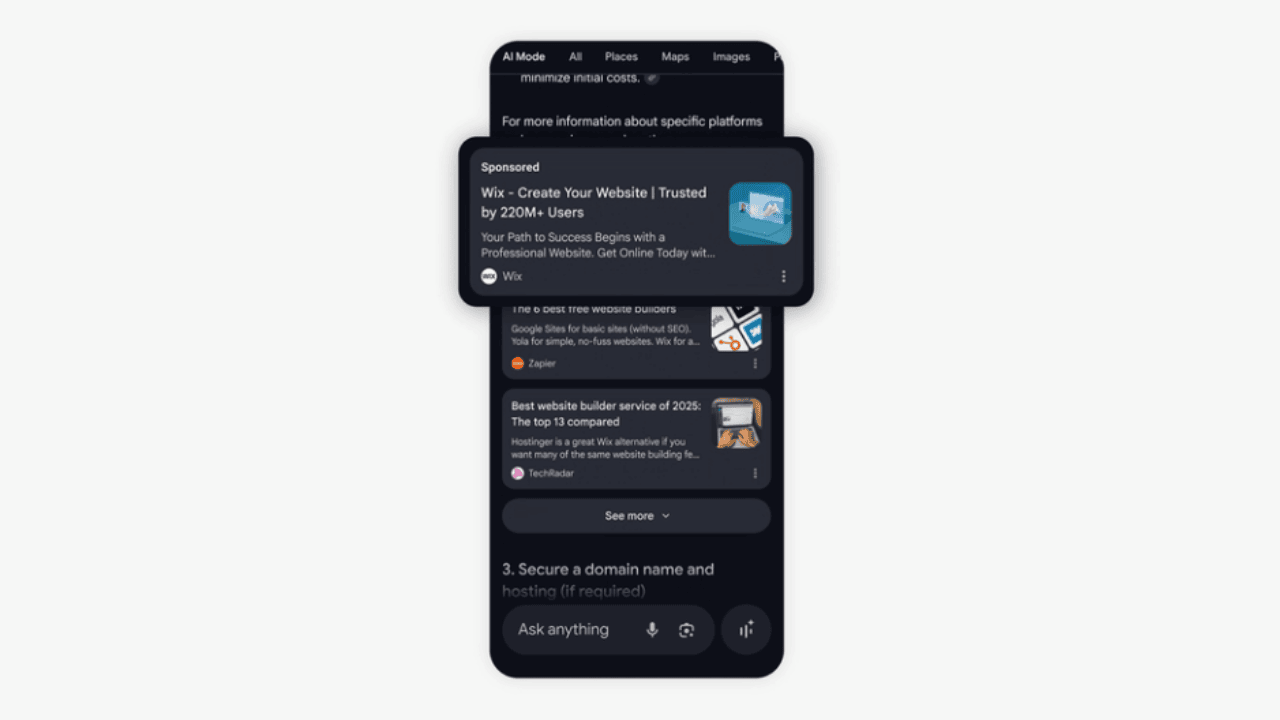
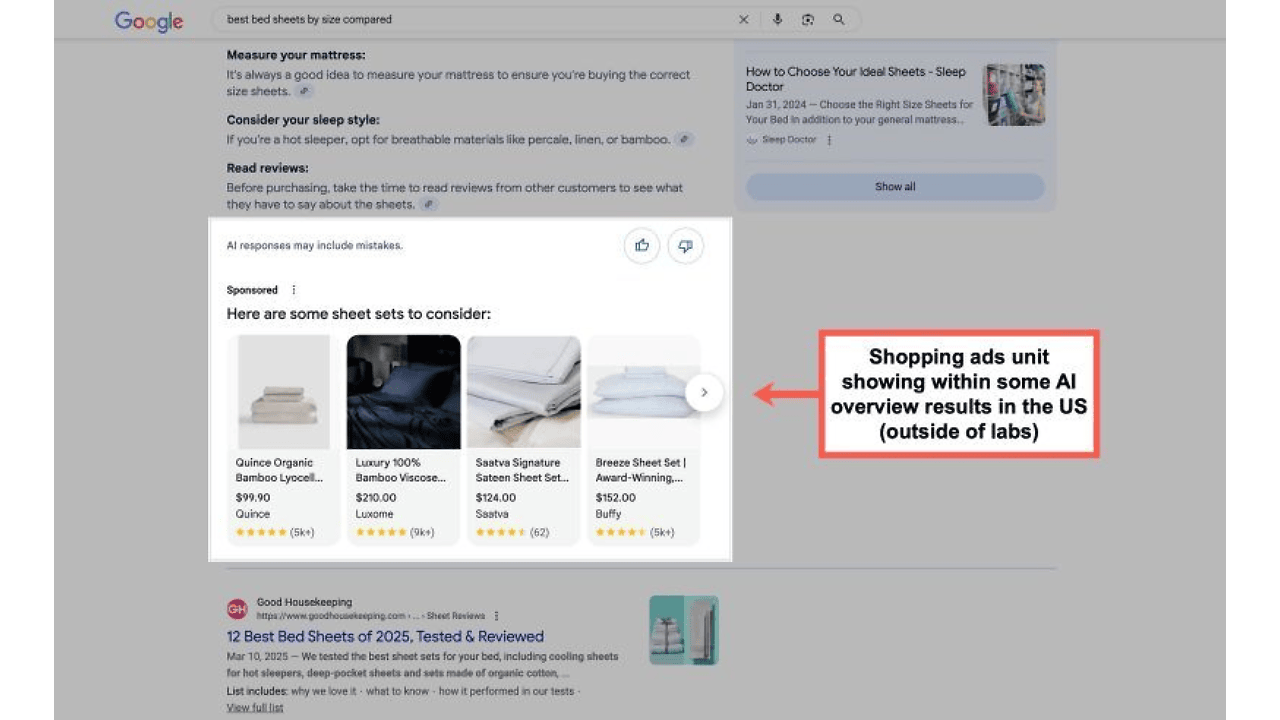
⚠️ Note: Ads never show in both places in the same auction. Google’s Ads Liaison Ginny Marvin confirmed that ads appear either within the AI Overview or above and below it, but not both, and when both qualify, the above and below placement takes priority.
Which Countries Have Ads Inside AI Overviews
Ads inside AI Overviews currently run in English, on mobile and desktop, in twelve countries:
Australia, Canada, India, Indonesia, Kenya, Malaysia, New Zealand, Nigeria, Pakistan, Philippines, Singapore, and the US.

That list went from one market to twelve in December 2025. If you run accounts in the EU, including the Czech Republic, you are not in this group. Your ads can still show above and below the overview, but nothing serves inside the unit yet.
🌍 Want the rollout timeline?
See how ads in AI Overviews expanded beyond the US at the end of 2025.
Match Types: The Rule Most Advertisers Miss
This is the single most actionable detail in the whole topic, and it is easy to miss because it only affects the in-overview placement.
Exact match keywords cannot serve inside AI Overviews at all. Only broad match or keywordless targeting competes in that auction. Exact match can still trigger ads above or below the overview.
Google originally had a behavior where an exact match keyword suppressed the identical broad match keyword, which meant that if you had both, you were quietly locked out of the in-overview placement. In December 2025, Ginny Marvin confirmed that exact match no longer blocks broad match in AI Overviews.
What this means for your account:
- If you run exact match only, you are not eligible for ads inside AI Overviews. Period.
- Broad match, AI Max for Search, Performance Max, Shopping, and Dynamic Search Ads are the targeting types Google names as the route into that placement.
- Having both match types in the same account is no longer a problem for eligibility.
🤖 Not using AI Max yet?
Google is making AI Max the default for more Search campaigns, so the keywordless route into this placement is coming to you either way.
Your Ad Group Prioritization Rules Do Not Apply Here
This one is buried in Google’s help docs and almost nobody talks about it, but it changes how you read your own account.
Normally, when a search term is identical to one of your keywords, that keyword’s ad group is prioritized. Google lists advanced search experiences, naming AI Overviews, Lens, and auto-complete searches, as an exception.
On those surfaces:
- The search term you see in reporting is “the best approximation of the user’s intent”, not necessarily what the user typed.
- Because these searches are not considered technically identical to a keyword, your keywords may not be prioritized at all.
- Instead, AI-based ad group prioritization picks whichever ad group or asset group best matches the overall intent.
So if you spot a search term firing from an ad group you did not expect, and the query looks long and conversational, this is a likely explanation. Your tight ad group structure does not govern the match on these surfaces.
What Google Excludes
Google states it currently does not show ads in AI Overviews for sensitive verticals, naming adult, alcohol, gambling, finance, healthcare, politics, and more.
If you manage accounts in any of those categories, in-overview placement is off the table regardless of your match types or budget. Above and below placements still apply as normal.
One exception is already being tested. In October 2026 Google confirmed to Adweek that it has recently expanded AI Mode and AI Overviews to feature certain pharmaceutical products, letting pharmaceutical advertisers run both text and Shopping ads in Sponsored sections. The test is limited to the US, and Google’s help documentation still lists healthcare among the excluded verticals, so treat this as a live test rather than a policy change. See pharmaceutical ads tested in AI Mode and AI Overviews.
How Ads Get Triggered
Ads can trigger on a subset of AI Overview queries, but only when a set of conditions is met.
Three conditions before your ad is even eligible
Commercial intent: Google has to detect commercial intent in the user’s query, even when the query itself does not look commercial at all.
Available inventory: Google has to have quality ads that are relevant to the query.
Overview relevance: for the placement inside the overview only, your ad also has to be relevant to the content of the AI Overview itself.
Meeting all three does not get you shown. It makes you eligible. You still have to win the auction.
Google’s own example is worth reading carefully, because it shows how far from a commercial keyword this can go. A user searches “why is my pool green and how do I clean it”. The overview suggests testing the water, removing debris, or vacuuming. The query itself is not commercial, but the combination of query and overview content signals commercial intent, so Google serves ads for pool vacuum cleaners.
You are not bidding on “pool vacuum cleaner” and winning. You are being matched to a problem that your product happens to solve.
Targeting and Opt-Out Controls
Short version: there are none.
- Can you target only AI Overview placements? No. Google states you cannot directly target ad placements in AI Overviews.
- Can you opt out? No. There is no setting, no exclusion, no checkbox.
Your eligibility comes from the same things that win you top-of-page impressions today: bidding, budget, Ad Rank, relevance, and landing page quality.
Reporting: There Is No AI Overviews Column
Ads inside AI Overviews are reported as Top Ads. Google Ads currently offers no segmented reporting for this placement, and Google says the experience is still in early stages and it will announce when there is more to share.
Practically, that means:
- Do not promise a client an “AI Overviews performance report”. It does not exist.
- Watch Top impression rate and Top of page rate as your closest proxy signals.
- Segment by device and use manual SERP checks on your key queries to see what is actually rendering.
- Treat your search term report as directional on these queries, since Google states the term shown is an approximation of intent.
The one AI Overviews report that does exist, and why it will not help your ads
Merchant Center has an AI performance insights report that shows how your brand is discovered on AI Mode and AI Overviews, with share of voice against your competitor set, query frequency, query type, and a scorecard splitting queries into Discovery, Evaluation and Purchase shopping stages.
Two catches:
- The traffic scope is strictly Organic AI, for example free listings. Paid Ads traffic is not included.
- It covers English-language queries only, for Merchant Center accounts in Australia, Canada, India, New Zealand and the United States.
Useful for understanding demand and where your brand shows up. Useless as a report on your AI Overview ad performance.
📊 Selling products?
Read what AI performance insights in Merchant Center will and will not tell you about your visibility on Google AI surfaces.
How AI Overviews Impact Your Paid Search Performance
You will not see a clean before and after, because the placement arrived without a switch and without a metric. What changes in practice:
- Your impression mix shifts. AI-generated answers push the traditional organic block further down, so more of the commercial attention on a query concentrates into the ad slots around the overview.
- Your query mix gets longer. These are exploratory, question-shaped searches, so expect search terms that no marketer would have written into a keyword list.
- Your exact match coverage stops being enough. Anything you have not opened up to broad match or keywordless targeting simply does not compete for the in-overview slot.
- Your optimization levers move upstream. With no placement bid adjustment and no exclusion, the work is in targeting breadth, Smart Bidding, feed quality, and landing pages.
Treat it as a shift in where your existing budget lands, not as a new channel to fund separately.
Timeline: How We Got Here
- May 2024: At Google Marketing Live, Google announces tests of Search and Shopping ads inside AI Overviews using existing campaigns. See our GML 2024 coverage.
- October 2024: Ads are spotted live in AI Overviews, and AI Overviews reach 100+ countries.
- November 2024: Paid text ads appear inside AI Overviews, and Google’s 2024 Ads recap lists the placement as available for mobile users in the US.
- May 2025: GML 2025 confirms the expansion to desktop, Shopping ads go live, and Google publishes its official help page.
- December 2025: In-overview ads expand to twelve countries, and the exact match blocking behavior is removed. Google’s Highlights of 2025 confirms the year’s expansion to desktop and more countries globally.
What to Do in Your Account
Since you cannot target or exclude the placement, everything you can do sits upstream of the auction.
- Add broad match coverage where it makes sense. Without broad match or keywordless targeting, you are structurally ineligible for in-overview placement. Pair it with Smart Bidding, which Google explicitly recommends alongside it.
- Watch your search terms harder than usual. Broad match on exploratory queries produces exactly the kind of long, question-shaped search terms that need pruning. Build negatives on a schedule.
- Keep Dynamic Search Ads or AI Max in the mix. These are the keywordless routes Google names for this placement.
- Write ads that answer a problem, not just a product. The in-overview match is against the overview’s content. Copy that speaks to the task, like getting your pool clear again, lines up better than copy that only names a SKU.
- Clean up your Shopping feed. Google’s best practices for this placement are feed-specific: keep product data current, review descriptions, pricing, promotions, shipping and returns, and supply enough high-quality, diverse images and videos to power the richer units.
- Fix landing page quality. Google’s guidance for this surface leans on high-quality creative on your website, and Ad Rank still gates everything.
- Consider text customization in AI Max for Shopping. Google positions it as ready for next-generation search, built to perform in AI Overviews by dynamically rewriting product titles to match the query instead of serving your static feed title. Note that Final URL expansion requires text customization to be on, so treat them as one decision.
- Do not pin your RSA headlines by default. Google’s responsive search ads best practices page now carries its own AI Overviews section, and its standing advice is to pin only when a campaign goal demands consistent messaging, since pinning limits the combinations Google can assemble for these varied queries.
🛒 Running Shopping or Performance Max?
A weak feed limits you here more than a weak bid does. See what the product titles report reveals about AI-generated product names before you touch budgets.
AI Overviews Ads vs ChatGPT and Other AI Search
An ad inside an AI Overview is not the AI recommending your brand. It is a paid, labeled slot rendered next to the AI’s answer, and it disappears the moment you stop paying. It also has no effect on how ChatGPT, Perplexity, or Gemini answer questions about your category.
If you want visibility across AI systems in general, that comes from earned citations, strong content, reviews, and clean entity data. Buying AI Overview placements and building AI-visible content are two separate projects, and you need both.
Frequently asked questions
No. Google states that you cannot opt out of serving ads in AI Overviews, and you cannot directly target the placement either. Your ads are eligible through your existing Search, Shopping, Performance Max and App campaigns, and eligibility is decided by the normal auction signals: bidding, budget, Ad Rank, relevance and landing page quality.
Above and below the overview, existing text, Shopping, local and app ads from Search, Shopping, Performance Max and App campaigns are eligible. Inside the overview, only text and Shopping ads from Search, Shopping and Performance Max campaigns are eligible. Display, Video and Demand Gen campaigns are not part of this surface.
Ads inside AI Overviews run in English on mobile and desktop in twelve countries: Australia, Canada, India, Indonesia, Kenya, Malaysia, New Zealand, Nigeria, Pakistan, Philippines, Singapore and the US. Ads above and below the overview are eligible in all 200+ markets where AI Overviews are available, which includes the EU.
Not for the placement inside the overview. Only broad match or keywordless targeting competes in that auction, so an account running exact match only is not eligible. Exact match keywords can still trigger ads above and below the overview. Google confirmed in December 2025 that an exact match keyword no longer blocks the identical broad match keyword from serving inside AI Overviews.
There is no dedicated metric. Ads inside AI Overviews are reported as Top Ads, and Google Ads currently offers no segmented reporting for the placement. Use Top impression rate and Top of page rate as proxy signals, segment by device, and check the live search results for your key queries. Merchant Center AI performance insights covers AI Overviews but its traffic scope is organic only, so it excludes paid ads.
The AI answer pushes traditional organic listings further down, so commercial attention concentrates into the ad slots around it. Your query mix gets longer and more conversational, exact match coverage stops being enough to compete for the in-overview slot, and your optimization work moves upstream into targeting breadth, Smart Bidding, feed quality and landing pages.
No. An ad in an AI Overview is a paid, labeled slot inside Google Search that disappears when you stop paying. It is not the AI recommending your brand and it has no effect on how other AI systems answer questions about your category. Visibility there comes from earned citations, content, reviews and clean entity data.
Start With Your Match Types
The fastest check you can run today: open your top-spending Search campaigns and look at how much of your traffic sits on exact match only. If the answer is most of it, you are invisible inside AI Overviews by structure, not by performance.
Add broad match coverage, back it with Smart Bidding and solid negatives, and give your feed and landing pages the attention this placement actually rewards.