Your One-Stop Source for the Latest PPC News

Share Ad Preview Live for Performance Max

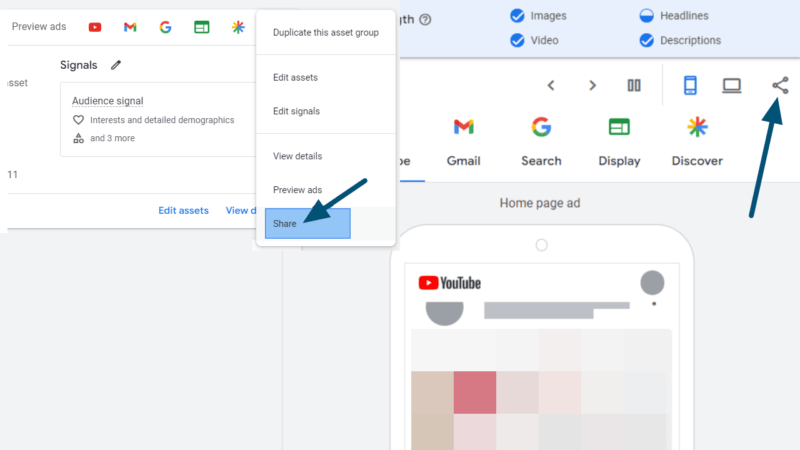
A screenshot of a Google Ads interface shows a drop-down menu with options such as "Duplicate this asset group," "Edit assets," and "Share Ad Preview" highlighted. In the background, the screen features a Performance Max mock-up of a mobile YouTube ad.

In February, Google introduced a sharing feature for Performance Max. It is now available in select accounts.

This functionality creates a link that leads to a preview page for a specific asset group, showcasing combinations of assets along with the option to review variations across available networks. Anyone with the link can access the preview page, no Google Ads access required.

It was announced a week ago, that this feature will be extended to Demand Gen as well.

Where is the new Share ad preview feature located?

It is available from two locations.

At the Asset group level, click on the three dots and select Share.

A screenshot of a user interface shows a dropdown menu with options like "Duplicate this asset group," "Edit assets," and "Share" highlighted with a blue arrow. The background features Performance Max icons for previewing ads and audience signals.

When creating or editing an ad you can find the Share icon on the right side next to the devices just below the ad stregth.

A screenshot of the Google Ads interface showcases Performance Max channels like YouTube, Gmail, and Search. A sample ad preview appears on a smartphone screen, with an arrow pointing to a sharing icon at the top right. The ad strength is labeled "Average.

When you choose to share a preview, a pop-up window will appear, providing the link. This link can be shared with anyone, as access to Google Ads is not required.

Screenshot of a Google Ads interface displaying an "Ad Preview" window. It shows a partially blurred link and two buttons: "Copy link" and "Done." The window indicates the Performance Max preview link is accessible to anyone with it.

Finally, this is what the preview looks like to a person who opens the link.

An ad preview of Google Discover is displayed on a mobile device screen. Icons for various services like YouTube, Gmail, Search, and Display are visible at the top. The content remains blurred and indistinct, optimizing Performance Max for a seamless share experience.

Scott Carruthers was the first to spot this feature live. The screenshots were made by Hana Kobzová.
Share this article
0
Share
Shareable URL
Read next