Disclaimer: This post may contain affiliate links. If you make a purchase through them, we may earn a commission at no extra cost to you.

Privacy regulations like GDPR and the ePrivacy Directive have made one thing crystal clear: you need user consent before collecting or processing personal data. That’s where Google’s Consent Mode comes in. It allows you to respect visitor choices while still keeping your analytics and ads running with the insights you need.
In this guide, I’ll walk you through exactly what GoogleConsent Mode is, how it works behind the scenes, and the steps to implement it effectively on your site.
📘 Did you know Google isn’t the only one with a Consent Mode? Consent Mode is a broader concept used by multiple platforms to balance privacy and data collection
👉 Learn more in our Ultimate Guide to Consent Mode
Ready to dive in? Let’s get started.
What is Google Consent Mode?
Google Consent Mode is a framework that allows websites to adjust how Google tags (such as Google Ads and Google Analytics) behave based on user consent choices.
Instead of blocking all data collection when users opt out, Consent Mode ensures that non-identifiable data is still gathered in a privacy-compliant manner.
Here’s the key difference:
- Without Consent Mode: If a user says “no” to cookies, tracking shuts off completely.
- With Consent Mode: Tags still fire in a privacy-friendly way, sending back non-identifiable, aggregated data instead of nothing at all.
The result is simple. You stay compliant with privacy laws and still keep the measurement you need.
Key Benefits of Consent Mode
- Stay compliant without losing insights: You meet GDPR and other privacy requirements while still collecting useful data. Non-compliance can be costly. See what fines you could face if you ignore Consent Mode.
- Keep Google Ads and Analytics running: Even if users decline tracking, your reporting doesn’t go completely dark.
- Access modeled conversions: Google fills in the gaps with statistical modeling so you don’t miss out on key performance data.
- Improve remarketing and audience measurement: Respect consent while still being able to build audiences and optimize campaigns effectively.
How Google’s Consent Mode Works
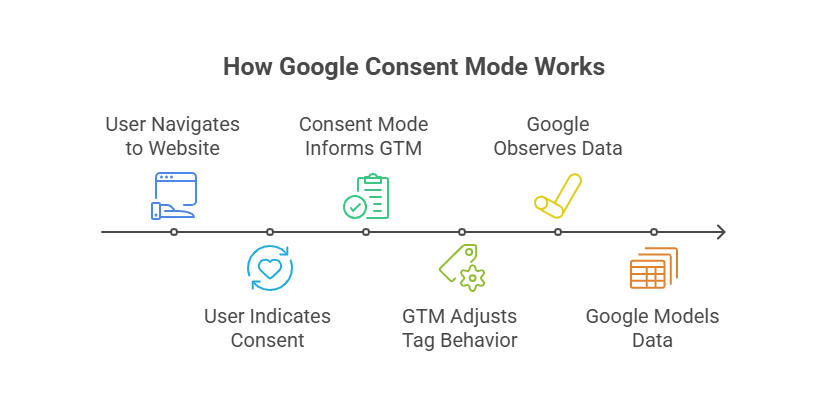
Google’s Consent Mode connects directly with your cookie consent banner. When a visitor makes a choice, Consent Mode decides which Google tags should fire and how they should behave. In other words, it adjusts tag behavior in real time based on the consent signals provided.
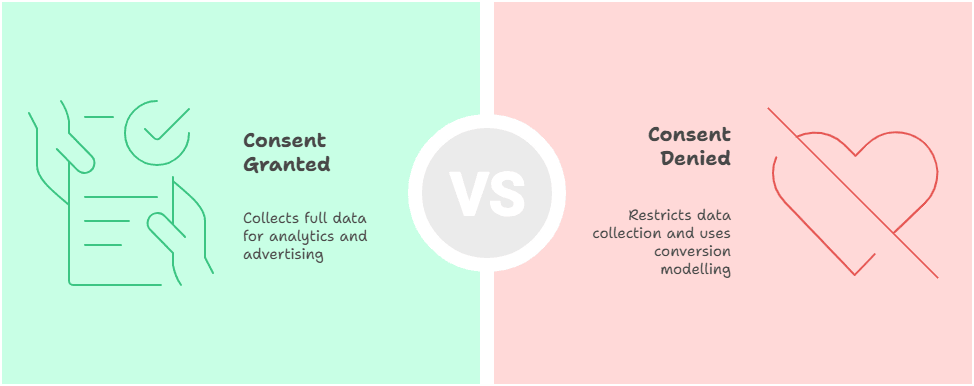
There are two main consent states:
- Consent Granted: If a user accepts cookies, Google tags run normally, collecting analytics and advertising data.
- Consent Denied: If a user declines cookies, Google restricts data collection and instead uses conversion modelling to estimate performance.
This setup ensures your site respects user privacy while still giving you the data you need to optimize campaigns.
Basic vs. Advanced Consent Mode v2
Google’s Consent Mode started with a Basic version, but has since evolved into the more powerful Advanced version (Consent Mode V2). The advanced setup has largely replaced the basic one, offering additional features, more granular control, and greater benefits for advertisers.
Basic Consent Mode
- Tag Loading: Google tags are blocked and do not load until the user interacts with the consent banner.
- Data Transmission: No data is sent to Google before the user gives consent, not even the consent status.
- Consent States: Consent states are sent only after user interaction.
- Tag Behavior: Tags load and execute only when consent is granted.
- Storage types: Uses analytics_storage and ad_storage only.
- Conversion Modeling: Uses a generalized model that is less precise.
- Use Case: Best for businesses prioritizing simple compliance and privacy, with minimal technical setup.
- Impact: When no consent is given, Google tags are completely blocked, leading to limited tracking and no behavioral modeling.
Advanced Consent Mode v2
- Impact: Enables enhanced conversion and behavioral modeling even for users who deny consent, while respecting privacy by not writing cookies or accessing personal data without consent.
- Tag Loading: Google tags load immediately when the user accesses the site or app but start with default consent states usually set to denied.
- Data Transmission: Even if consent is denied, tags send cookieless pings (non-identifying aggregate data) to Google. Full data is sent only once consent is granted.
- Consent States: Default consent states are set on page load and dynamically updated based on user interaction.
- Tag Behavior: Tags adjust their behavior in real-time based on user consent changes.
- Storage types: Uses ad_storage, analytics_storage, personalization_storage, ad_user_data, ad_personalization, functionality_storage and security_storage.
- Conversion Modeling: Uses advertiser-specific modeling, which is more accurate and detailed.
- Use Case: Suitable for businesses requiring detailed tracking, behavioral modeling, and ad optimization, with technical expertise available for setup.
If you’re more of a visual learner, here’s the comparison laid out in a table:
| Feature | Basic Consent Mode | Advanced Consent Mode (v2) |
|---|---|---|
| Tag Loading | Tags are blocked and do not load until the user interacts with the consent banner. | Tags load immediately when the page opens, starting with default consent states (usually denied). |
| Data Transmission | No data is sent to Google before consent is given, not even consent status. | Cookieless pings (non-identifying data) are sent even if consent is denied. Full data is sent only after consent is granted. |
| Consent States | Sent only after the user interacts with the banner. | Default consent states load on page access and are updated dynamically as users make choices. |
| Tag Behavior | Tags execute only when consent is granted. | Tags adjust behavior in real time based on user consent changes. |
| Storage Types | Limited to analytics_storage and ad_storage. | Includes ad_storage, analytics_storage, personalization_storage, ad_user_data, ad_personalization, functionality_storage, and security_storage. |
| Conversion Modeling | Uses a generalized, less precise model. | Uses advertiser-specific modeling for more accurate insights. |
| Use Case | Best for businesses focused on simple compliance and minimal setup. | Designed for businesses needing detailed tracking, behavioral modeling, and ad optimization. |
| Impact | When no consent is given, Google tags are completely blocked, resulting in limited tracking and no behavioral modeling. | Allows enhanced conversions and behavioral modeling even when consent is denied, while still respecting privacy. |
❓ Did you know Microsoft Advertising also has its own Consent Mode?
It works a bit differently from Google’s version and is essential if you’re running campaigns on Microsoft Ads. Learn more in our complete guide to Microsoft Consent Mode.
Storage Types
Google’s Consent Mode uses the following storage types to adjust tag behavior for different consent types:
- ad_storage: Controls storage of advertising cookies (e.g., Google Ads, Meta).
- analytics_storage: Controls storage of analytics cookies (e.g., Google Analytics 4, Microsoft Clarity).
- personalization_storage: Manages cookies that enable personalized experiences, such as showing tailored content or ads based on a user’s interests and behavior (e.g., Google Ads, Meta).
- ad_user_data: Controls the sending of user-level data for advertising purposes (e.g., Google Ads, Google Analytics 4, Meta).
- ad_personalization: Controls whether data is used for personalized advertising, such as remarketing and interest-based ads (e.g., Google Ads, Google Analytics 4, Meta).
- functionality_storage: Controls cookies that keep your website usable and convenient for visitors (e.g., language settings, shopping cart).
- security_storage: Manages cookies used for security purposes. This includes storing information to verify a user’s identity, support authentication, prevent fraudulent activity, and protect against unauthorized access. In short, it ensures your website or app runs safely for both you and your users.
These signals help Google determine how much data it can collect while staying compliant with privacy laws.
Implementation Guide
To integrate Google’s Consent Mode, you need to work with your website’s cookie consent banner provider or update your Google Tag Manager setup.
Most websites use a Consent Management Platform (CMP) to handle cookie consent banners. Ensure that your CMP supports Google’s Consent Mode and can pass consent signals correctly.
Let’s take a look at how you can enable Google Consent Mode with Cookiebot. It’s one of the simplest ways to get started, and the setup can be done in just a few minutes.
Use Cookiebot CMP to collect user consent, stay compliant with GDPR and other global regulations, and ensure proper implementation of Consent Mode. Trusted by millions, available in 47+ languages, it’s the most popular solution for balancing privacy and performance. Easy to set up, fully customizable, and Google-certified.
![Get Started with Cookiebot Today With 15% Off for 6 Months [SPECIAL OFFER]](https://ppcnewsfeed.com/wp-content/plugins/wp-fastest-cache-premium/pro/images/blank.gif)
To get started, follow one of these step-by-step tutorials:
- How to Install Cookiebot on WordPress
- How to Install Cookiebot with Google Tag Manager
- How to Set Up Cookiebot on Shopify
📈 Using Cookiebot for Google Consent Mode? Compare plans and pricing in this Cookiebot Pricing Guide.
Step 2: Testing Consent Mode Implementation
Once your CMP is live and Google Consent Mode is enabled, the next step is testing. Make sure tags fire correctly based on user choices and that consent signals are passed as intended.
If you’re not sure where to start, I’ve put together a detailed guide with 9 methods to test Consent Mode on your site to confirm everything is working the way it should. It covers both simple checks and more advanced techniques, so you can pick the approach that suits you best. The goal is the same: making sure Consent Mode is working correctly.
Best Practices for Using Google Consent Mode
- Choose a reliable Consent Management Platform (CMP) that integrates seamlessly with Google. If your current setup feels clunky or uncertain, Cookiebot is a solid option to consider. In my experience, it’s straightforward to implement and makes enabling Google Consent Mode very simple.
Use Cookiebot CMP to collect user consent, stay compliant with GDPR and other global regulations, and ensure proper implementation of Consent Mode. Trusted by millions, available in 47+ languages, it’s the most popular solution for balancing privacy and performance. Easy to set up, fully customizable, and Google-certified.
- Test Consent Mode regularly to ensure compliance and avoid data loss.
🕵️ Want proof your Consent Mode is working? Here are 9 methods to test Consent Mode on your site.
- Use Consent Mode v2 (Advanced Consent Mode) if your business relies on conversions to optimize ad performance.
- Stay up to date with Google’s data privacy policies and the privacy laws that apply to your business.
Final Thoughts
Google Consent Mode might feel technical at first, but in practice it’s a straightforward framework that delivers long-term value.
Think of it as laying the foundation for privacy-led marketing. Once it’s set up and tested, it runs quietly in the background, keeping you compliant, preserving valuable insights, and building trust with your users.
Hana Kobzová is a freelance PPC specialist and the founder of PPC News Feed. Named among the TOP 100 Most Influential PPC Experts 2026, she is also a Google Ads Product Expert and a Microsoft Advertising Certified Professional. Hana delivers clear updates and actionable insights that help marketers save time and work smarter.