Disclaimer: This post may contain affiliate links. If you make a purchase through them, we may earn a commission at no extra cost to you.

You’re running Google Ads campaigns, hitting your lead targets, and the numbers look good. But when your client asks which campaigns are driving actual revenue, you don’t have an answer. The leads are there. The closed deals are in the CRM. The connection between the two isn’t.
That’s the problem offline conversion tracking solves.
This guide walks you through everything you need to know to track offline conversions correctly: what it is, why it matters, how each major platform handles it, and how to set it up properly from the start.
What is Offline Conversion Tracking?
Offline conversion tracking (OCT) is the process used to track conversions that happen outside the browser: in a CRM, over the phone, in a store, or in a offline sales meeting.
The typical flow looks like this:
- A user clicks on your ad. The platform appends a unique click identifier to the landing page URL.
- Your website captures that click ID and stores it alongside the lead’s contact details.
- The lead enters your CRM and progresses through your sales pipeline over days, weeks, or months.
- When the deal closes (or the purchase happens offline), you upload the conversion data back to the ad platform with the original click ID.
- The platform matches it to the original click and attributes the conversion to the right campaign, ad group, and keyword.

The previous example only tracks the final sale. But offline conversion imports allows you to measure the entire sales cycle, not just the last step.
Think about a typical lead journey:
First call → Quote sent → Agreement signed.
When you use offline conversion tracking, you can track each of these milestones and feed them back into the ad platform instead of waiting only for the closed deal.
⚠️ REMEMBER: The more data you send back to the platforms, the better the algorithm can understand who your ideal customers actually are. And also, with richer offline signals, you can optimize more accurately, reflect the true value of your leads, and properly compare real revenue against campaign costs.
Common use cases include:
- B2B deals closed by a sales team after a long pipeline
- Phone orders or consultations
- In-store purchases influenced by an online ad
- Qualified leads tracked through CRM stages (MQL, SQL, closed-won)
- Booked appointments and demos
The Click IDs Across Platforms
The core identifier in this process is the click ID, a unique string appended to your landing page URL when someone clicks your ad.
However, the exact identifier and technical rules vary by platform. Each platform has its own click ID and upload window. Here are the main ones:
| Platform | Click ID | Stored in | Max Upload Window |
|---|---|---|---|
| Google Ads | GCLID | URL parameter | 90 days (63 days for Enhanced Conversions) |
| Microsoft Advertising | MSCLKID | URL parameter | 90 days |
| Google Analytics 4 | client_id / session_id | Cookie | 72 hours (backdating limit) |
| Meta (Facebook/Instagram) | FBCLID | URL parameter + _fbc cookie | 62 days |
| li_fat_id | Cookie | 90 days |
Privacy-First Offline Conversion Tracking
As privacy regulations tighten and browser restrictions increase, relying only on click IDs is no longer enough.
Beyond click IDs, platforms increasingly accept hashed PII identifiers, meaning Personally Identifiable Information, including:
- SHA-256 hashed email addresses
- Phone numbers formatted in E.164 (e.g. +14155153679)
- Name and address
These identifiers can be used as primary or supplementary match keys when importing your offline conversions.
You can rely on click IDs, hashed user data, or combine both at the same time. Using a dual-identifier setup that includes both the click ID and hashed user data maximizes match rates and improves resilience against privacy restrictions.
In short, this approach strengthens attribution accuracy while staying aligned with modern privacy requirements.

⚖️ Want to understand the privacy side of offline conversion tracking? Learn more in the privacy section of this article and make sure your setup stays compliant.
Why Offline Conversion Tracking Matters
Without offline conversion data, your bidding algorithms are working with incomplete information.
When you only send platforms top-of-funnel signals such as form submissions, Smart Bidding optimizes for the cheapest form fills, not for the most valuable customers.The result is often a high volume of low-quality leads that waste your sales team’s time.
By importing offline conversion data, you shift the optimization target from lead quantity to actual business outcomes. The algorithm learns which types of users, keywords, and creatives drive real revenue and allocates budget accordingly.
The practical benefits:
- More accurate ROI measurement: Tie actual revenue back to specific campaigns and keywords.
- Better Smart Bidding performance: Advertising platforms use offline signals to improve automated bidding.
- Clearer budget decisions: Identify which campaigns drive profitable customers, not just cheap clicks.
- Complete customer journey view: Understand what happens after the form submit.
Google reports that using first-party data alongside click IDs for offline measurement delivers a median 10% increase in conversions compared to standard imports.

Which Platforms Support Offline Conversion Tracking
Google Ads
Google has the most advanced and mature offline conversion infrastructure of any advertising platform.
From traditional GCLID uploads to Enhanced Conversions for Leads and privacy-resilient identifiers for iOS traffic, Google offers multiple ways to connect ad clicks with real revenue.
However, not all methods are equal. Let’s break them down.

GCLID Import (Legacy)
How the legacy GCLID import works:
- Enable auto-tagging in your Google Ads account so every click carries a GCLID parameter.
- Add JavaScript to your landing pages to capture the GCLID from the URL and store it in a first-party cookie.
- Pass the GCLID as a hidden field in your lead forms so it lands in your CRM alongside the contact details.
- Create a conversion event in Google Ads: Goals > Conversions > New conversion action > Conversions offline.
- When a lead converts offline, export the relevant data, including the GCLID, conversion name, conversion time, and value, and upload it back to Google Ads either by importing a file, through the API, or by using integrations (e.g. Salesforce, HubSpot, or Zapier).
Enhanced Conversions for Leads (Recommended)
Google now recommends Enhanced Conversions for Leads over the standard GCLID import. The legacy GCLID-only approach is officially labeled a “legacy feature.”
Here’s what makes ECL different:
When a user submits a form on your site, a Google tag (configured via Google Tag Manager or gtag.js) captures their contact details (email address, phone number etc.) hashes them, and sends them to Google. This creates a privacy-safe touchpoint linked to a specific user.
When the lead later converts offline, you upload the same hashed identifiers (email address, phone number etc.) alongside the conversion data. Google matches the hashed data from the CRM against what was captured at form submission, even without a GCLID, across devices, and through cookie-clearing events.
Why ECL matters:
- More resilient to iOS restrictions, ad blockers, and cookie deletion
- Captures engaged-view conversions from video ads
- Supports cross-device attribution through Google Accounts
- Delivers a median 10% more conversions vs. standard GCLID import
The trade-off: ECL has a 63-day upload window instead of 90 days, and match rates are typically 40-50% when relying only on email or phone (not all leads have matching Google Accounts).
For best results, send both the GCLID and hashed user data.
iOS Traffic: WBRAID and GBRAID
Apple’s App Tracking Transparency (ATT) framework limits GCLID-based tracking for iOS users. When a user on iOS clicks your ad, Google may replace the GCLID with one of two privacy-preserving identifiers:
- WBRAID: used when a user clicks an ad on the web and converts on the web (web-to-web) on iOS
- GBRAID: used when a user clicks an ad and converts in an app on iOS
These identifiers work differently from GCLID. They are aggregated and privacy-safe, meaning they cannot be used to identify individual users. As a result, you cannot upload WBRAID or GBRAID values to attribute individual offline conversions the way you can with GCLIDs.
For iOS traffic, Enhanced Conversions for Leads is the recommended path, because it relies on hashed first-party data (email, phone) rather than click IDs, it works regardless of iOS restrictions.
Microsoft Advertising
Microsoft Advertising uses the MSCLKID (Microsoft Click ID), a 32-character GUID appended to landing page URLs when auto-tagging is enabled.
The setup flow mirrors Google Ads closely:
- Enable auto-tagging in your account settings.
- Capture the MSCLKID on landing pages and store it with the lead data.
- Create an Offline Conversion Goal in Microsoft Advertising.
- Upload conversions via CSV, scheduled import, or the Campaign Management API.
⚠️ Note: You must wait at least 2 hours after creating a new conversion goal before uploading any data. Conversions uploaded before this window will be rejected.
Google Analytics 4
GA4 takes a fundamentally different approach to offline data. Instead of click IDs, it uses client_id and user_id matching to connect offline events to prior web sessions.
Two pathways for offline data in GA4:
- Measurement Protocol: Sends HTTP POST requests server-side to GA4’s backend. Events appear in near-real-time and can be backdated up to 72 hours. Requires the client_id (from the _ga cookie), session_id, and a valid timestamp. Without all three, GA4 cannot link the offline event to the original web session and will show the conversion as (not set) or Unassigned.
- GA4 Data Import: Batch CSV uploads through the admin interface. Processing takes up to 24 hours. Timestamps beyond 72 hours of upload are ignored.
GA4’s Measurement Protocol does not accept GCLID directly. It relies on client_id to resolve the connection to the original ad click. This means GA4 typically attributes 20-30% fewer conversions than a direct Google Ads import.
💡 TIP: GA4 is best used for cross-channel analytics – understanding the full customer journey across Google, Meta, organic, and email. For bidding optimization, use the direct Google Ads import. Use both together for the complete picture.
Other Platforms
- Meta (Facebook/Instagram) – Uses Conversions API (CAPI) as the unified pipeline for all offline events. Multi-signal matching: hashed email, phone, FBCLID, and browser cookies. Upload window: 62 days from the offline event, 90 days from the original ad interaction.
- LinkedIn Ads – Conversions API supports hashed email (SHA256_EMAIL) and first-party click ID (li_fat_id). Upload window: 90 days.
- TikTok – Events API for server-to-server integrations including offline events.
- Pinterest – Conversions API for server-to-server connection.
How to Plan Your Offline Conversion Tracking Setup
Before you touch any platform settings, take the time to plan.
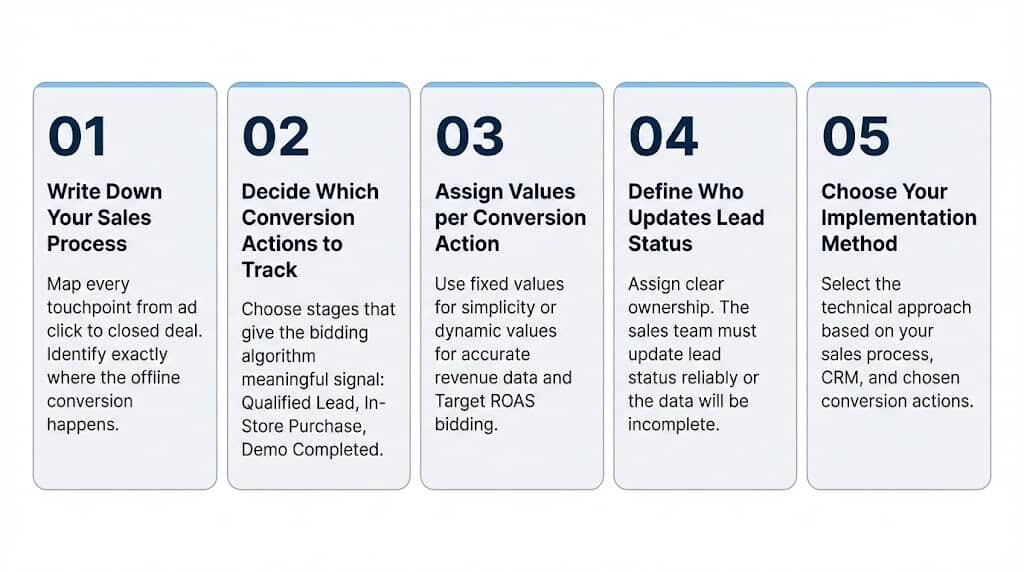
Work through these five questions first:
1. Write down your sales process
Map every touchpoint from ad click to closed deal. Where does the customer go? Who handles them? What systems do they pass through? Identify exactly where the offline conversion happens and which system records it.
2. Decide which conversion actions to track
Not every lead stage needs to be a conversion action. Choose the ones that give your bidding algorithm meaningful signal:
- For lead gen: Qualified Lead, Converted Lead
- For retail: In-Store Purchase, Phone Order
- For long sales cycles: consider mid-funnel milestones (Contract Sent, Demo Completed) to stay within the 90-day upload window
3. Assign values per conversion action
Decide whether to use fixed or dynamic values:
- Fixed value – simple to implement, less accurate (use the average deal value)
- Dynamic value – reflects the actual revenue generated per conversion, enabling Target ROAS bidding and more precise performance optimization.
4. Define who updates lead status and value
Clearly assign this responsibility. If nobody owns it, the data will be incomplete or inconsistent. The sales team needs to update the lead status reliably for OCT to work.
5. Choose your implementation method
Based on your answers above, select the approach plan your offline conversion tracking setup.
How to Implement Offline Conversion Tracking
Google Sheets (Manual Upload)
Best for: Low volume, simple setups, getting started quickly.
Price: Free solution
Export your CRM data, format it into the platform’s required CSV template (Google Click ID, Conversion Name, Conversion Time, Value, Currency), and upload manually through the platform’s UI. You can also schedule automatic imports from a hosted Google Sheet URL.
No-Code Automation (Zapier, Make.com, N8N)
Best for: Medium volume, no developer resources available.
Price: Free plan available, but paid plan typically required.
Zapier and Make.com offer free plans with limited operations, but these limits are typically not sufficient for ongoing offline conversion uploads at scale. In practice, you will need a paid plan to handle higher volumes. N8N can also be used for free if you self-host it. However, self-hosting requires maintaining your own server, which involves infrastructure costs and ongoing technical maintenance.
How does it work?
Set up a trigger in your CRM (deal moved to “Closed-Won”) that sends a webhook to your no-code automation platform. The automation formats the data and sends it to the platform’s API.
Once configured, the workflow runs automatically.
However, although it is marketed as “no-code,” the setup is not truly plug-and-play. You need a basic understanding of how these platforms work to configure the workflow correctly. Field mapping, timezone alignment, formatting conversion values and phone numbers properly, managing authentication, and troubleshooting failed webhooks can quickly become complex.
Specialized OCT Tools (Octanist)
Best for: Multi-platform setups and high conversion volume.
Price: Paid
If you are serious about offline conversion tracking, this is the most robust option.
These specialized tools handle click ID and PII capture, data normalization, and multi-platform uploads automatically. They also provide built-in diagnostics and match rate reporting, making it much easier to monitor data quality and identify issues early.
Personally, I use Octanist for my offline conversion tracking setups. It is a dedicated OCT platform where you can easily mark leads as qualified or won, or even as lost to stay organized, and assign a revenue value directly within the interface. Octanist then automatically pushes the correct conversion data to your ad platforms.
It integrates with Google Ads, Microsoft Advertising, Google Analytics 4, Meta, and many other platforms, making multi-channel offline tracking much easier to manage.
Here is the difference between standard conversion tracking and offline conversion tracking using Octanist:
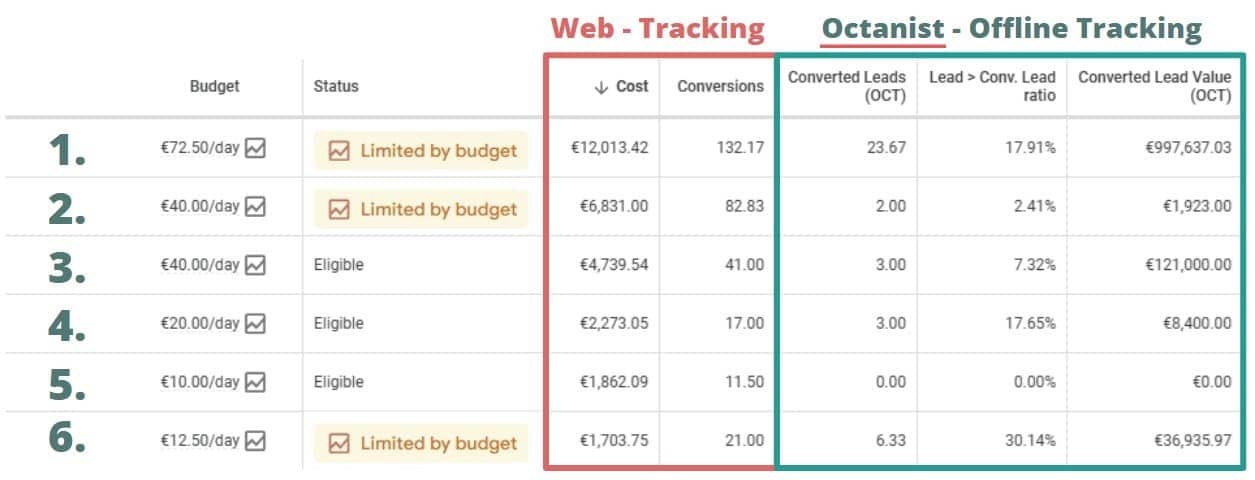
Take a close look at the image above. At first glance, the campaigns appear to perform well based on web tracking metrics alone. But once you compare those numbers with the offline conversion data, the picture changes completely:
- Campaign 2: Appears solid in web tracking with 82 conversions and limited by budget, but offline data shows only 2 actual customers and just €1,923 in revenue. High lead volume, very low business impact. Scaling this would likely increase wasted spend.
- Campaign 6: Seems average in web tracking with 21 conversions, yet offline tracking shows a 30.14% lead-to-sale rate and €36,935 in revenue. Lower volume, but very high-quality leads. This campaign is undervalued without offline data and likely deserves more budget.
What it covers out of the box:
- Direct integrations available with a wide range of advertising platforms.
- WordPress plugin and GTM template for fast setup without a developer. If you run into issues, their support team can assist you with the implementation.
- Automated uploads so your bidding data stays fresh.
- Consent supported with status automatically saved to each lead record
- Email notifications if a lead status has not been updated within a defined timeframe, helping you ensure conversions are uploaded before the maximum upload window expires.
- Lead dashboard with conversion rates and channel-level revenue breakdowns.
Stop optimizing for leads that never close. Octanist shows you which campaigns actually drive revenue, not just form fills.
Connect your lead data, mark leads as won, and Octanist pushes real revenue data to your ad platforms automatically.
See which channels and campaigns actually close deals, so you know exactly where to invest more.

Direct API / Server-Side Integration
Best for: Technical teams with developer resources, large-scale operations, or situations where you need full control over every aspect of the data pipeline.
This is the most powerful approach and the most complex. Your developers build a direct connection between your lead data and each platform’s API. You control exactly what data is sent, when, and how errors are handled.
All of the previous methods rely on a third-party tool (eg. Google Sheets, Zapier, Octanist). Here, everything runs directly through the platform itself, without any intermediary software involved.
The trade-off is clear: you need developer resources to build the integration, maintain it over time, and continuously monitor its stability. If something breaks or an API changes, your team is fully responsible for identifying the issue and fixing it.
Privacy and Consent Considerations
Hashed identifiers are not anonymous data. This is a common misconception that creates compliance risk.
Under GDPR (EEA/UK/Switzerland), SHA-256 hashed email addresses and phone numbers are still classified as personal data. They are pseudonymised, not anonymous. If someone has the original data, they can recreate the hash. This means:
- You need a lawful basis to process and share this data with ad platforms
- Your privacy policy must disclose the sharing of hashed identifiers with advertising platforms
- You need a Data Processing Agreement with each platform
- Cross-border transfers to US-based platforms require an applicable transfer mechanism (EU-US Data Privacy Framework)
Consent Mode V2 is mandatory for advertisers running Google campaigns in the European Economic Area, the United Kingdom, and Switzerland. You must signal ad_user_data and ad_personalization consent on every conversion upload.
🚨 If a user has not consented, you cannot use their data for offline conversion matching.
Under CCPA/CPRA (California), the framework is an opt-out model rather than opt-in. Businesses must offer a “Do Not Sell or Share My Personal Information” mechanism and honor Global Privacy Control signals. Sharing hashed customer data with ad platforms for cross-context behavioral advertising may trigger opt-out requirements.
Practical checklist for compliance:
- Treat hashed email and phone as personal data in your data mapping and Data Protection Impact Assessments
- Align your consent management platform (CMP) with your OCT pipeline – if a user denies consent, exclude their data from uploads
- Update your privacy policy to disclose offline conversion data sharing
- Use the
ad_user_dataconsent field in Google Ads API uploads where required
🔐 Want to understand Consent Mode? Explore our complete Consent Mode guide covering what it is, why it matters, and how to configure it the right way.
Common Errors and How to Fix Them
| Error | Cause | Fix |
|---|---|---|
| “GCLID too old” / “Identifiers too old” | Upload attempted after 90-day window | Set up mid-funnel conversion milestones (e.g., “Lead Qualified”) earlier in the sales cycle |
| “Click too recent” | Upload attempted within hours of the click | Build in a 12-24 hour delay before uploading conversions |
| Wrong timezone / invalid conversion time | Local timezone submitted instead of UTC | Standardize all CRM timestamps to UTC before upload |
| Low match rate / hashing errors | Incorrect normalization before SHA-256 hashing | Lowercase and trim all fields before hashing; use E.164 format for phone numbers |
| GA4 “Unassigned” or “(not set)” traffic | Missing session_id or client_id in Measurement Protocol payload | Capture both client_id and session_id at lead creation and include them in every MP request |
| “Conversion action not active” | Conversion goal was deleted or paused | Audit your CRM field mapping against active conversion action IDs regularly |
| Microsoft: data not appearing after upload | 6-hour reporting delay or 2-hour goal setup wait not respected | Wait 2 hours after goal creation; allow up to 6 hours for data to appear in reports |
Best Practices
- Capture click IDs at the moment of form submission. Use hidden form fields populated by JavaScript to pass the GCLID, MSCLKID, and other click IDs directly into your CRM.
- Send both the click ID and hashed user data. Click IDs give you deterministic matching. Hashed identifiers (email, phone) give you resilience when click IDs are missing due to iOS restrictions, ad blockers, or cross-device journeys. Use both for maximum match rate.
- Start with one platform and get it right before expanding. OCT is ongoing measurement infrastructure, not a one-time setup. Pick the platform driving your most important campaigns (usually Google Ads), map your sales process, decide the conversion values, get the data flowing, and verify it is working correctly. Then expand to other platforms. Trying to set up everything at once is the fastest way to end up with unreliable data everywhere.
- Upload conversions daily. Stale data degrades Smart Bidding performance. The sooner the algorithm receives the signal, the better it can adjust bids in real time.
- Use order IDs and event IDs for deduplication. Without stable deduplication keys, repeated uploads (or parallel browser + server tracking) will double-count conversions and inflate your reported numbers.
- Set mid-funnel conversion milestones for long sales cycles. If your deals regularly close after 90 days, a GCLID-based upload will be rejected. Track earlier stages (Lead Qualified, Demo Completed, Contract Sent) as conversion actions to keep your attribution within the upload window.
- Monitor platform diagnostics regularly. Google’s offline data diagnostics report classifies your data quality as Excellent (90%+ valid), Good, Needs Attention (below 70%), or No Recent Data. Check it regularly. A drop in quality usually indicates a capture or normalization issue upstream.
- Normalize before hashing. Each platform has specific rules. For email: lowercase and trim whitespace. For phone: use E.164 format (+14155153679). Apply these transformations before running SHA-256 – a single uppercase letter produces a completely different hash and will cause a failed match.
Conclusion
Offline conversion tracking is one of the most impactful things you can do for your PPC campaigns, and one of the most overlooked.
Most advertisers track form fills and call it a day. But form fills are not revenue. They are just the beginning of the sales process.
OCT closes that loop. It tells the algorithm what actually happened after the click: which leads became customers, which campaigns drove real revenue, and which were just burning budget.
The setup takes effort. You need to map your sales process, capture click IDs correctly, normalize and hash your data, and keep the uploads consistent. But once it’s running, it changes how you manage campaigns. You stop optimizing for volume and start optimizing for value.
The advertisers who will win in the next few years are those who invest in clean, reliable measurement today. Offline conversion tracking is a big part of that.
FAQ
Offline conversions are customer actions that happen outside the browser: a phone call, an in-store purchase, a deal closed by a sales team. They’re the part of the customer journey that online tracking tools can’t see by default.
Offline conversion tracking (OCT) is the process of connecting those offline actions back to the specific ad click that started the journey. You send the conversion data to the ad platform so it knows which campaign, ad group, or keyword drove the actual result.
Use it when your business converts outside the website: through a sales team, over the phone, in a store, or through a long CRM-based pipeline. If your current campaigns only track form fills but not closed deals, OCT is the next step.
When someone clicks on your ad, the platform appends a unique click ID to the URL. You capture that ID, store it in your CRM alongside the lead information, and upload it back to the platform when the lead converts. The platform matches the ID to the original click and attributes the conversion correctly.
It depends on your technical setup. If you have no development resources, a dedicated tool like Octanist is the easiest path. It handles capture, normalization, and uploads for you. If you’re comfortable with technical setups, your options are a manual CSV upload, no-code automation via Zapier or Make.com, or a direct API integration for full control.
The ad platforms themselves (Google Ads, Microsoft Advertising) don’t charge for it. The cost depends on your implementation method: manual uploads are free, no-code tools like Zapier or Make.com require a paid plan at any meaningful volume, and dedicated tools like Octanist are paid. A direct API integration is free but requires developer time to build and maintain.
Hana Kobzová is a freelance PPC specialist and the founder of PPC News Feed. Named among the TOP 100 Most Influential PPC Experts 2026, she is also a Google Ads Product Expert and a Microsoft Advertising Certified Professional. Hana delivers clear updates and actionable insights that help marketers save time and work smarter.