Disclaimer: This post may contain affiliate links. If you make a purchase through them, we may earn a commission at no extra cost to you.
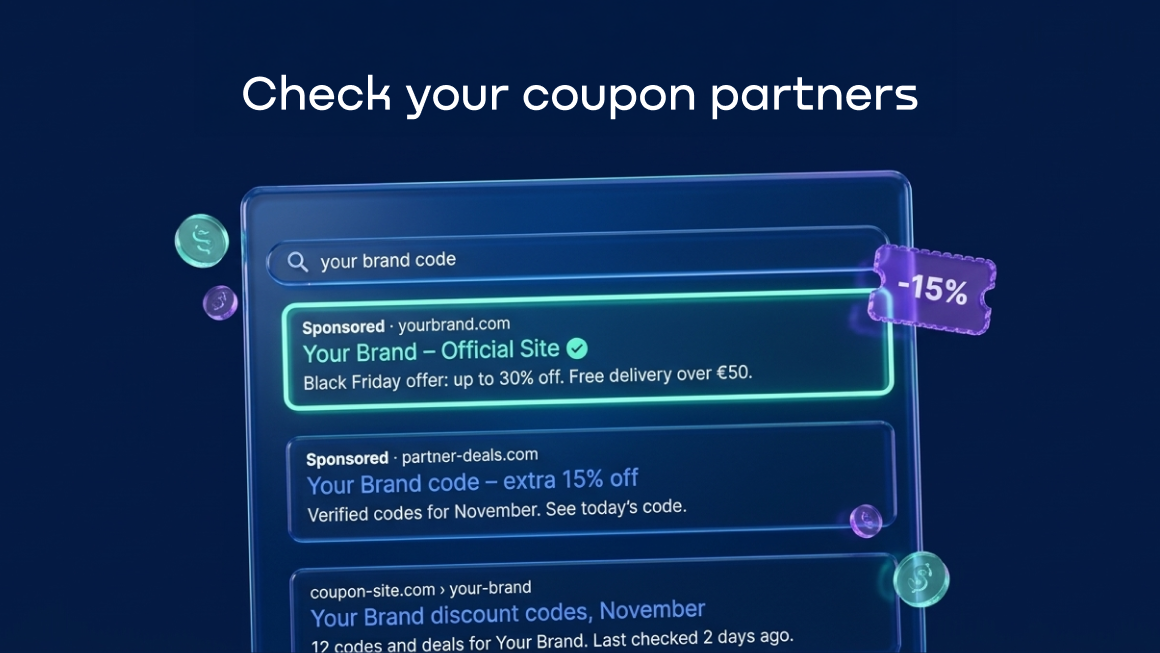
Coupon affiliates can be valuable partners. But when a shopper who was ready to buy takes a detour through a coupon page with an affiliate link, the commission you pay isn’t always buying you a new customer. And if affiliates also run ads on your brand terms, there is another cost to watch. Here’s what to check before November 27.
Imagine a customer with a €100 order sitting in their cart. Before checking out, they open another tab and search for a discount code. They find a coupon site, click its affiliate link, and return to the store to finish the purchase.
Depending on the program’s attribution rules, that last click could earn the coupon partner an €8 commission at an 8% rate. But could the customer have made the purchase anyway? Or was the discount exactly what persuaded them to complete the order? A conversion report alone can’t tell you which.
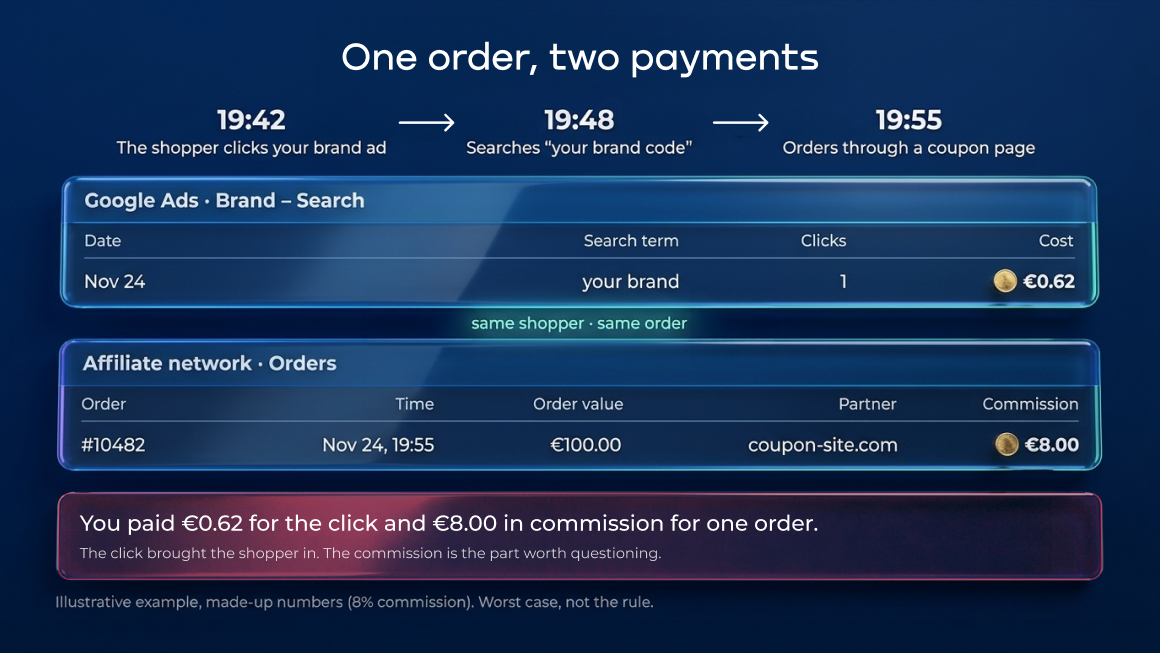
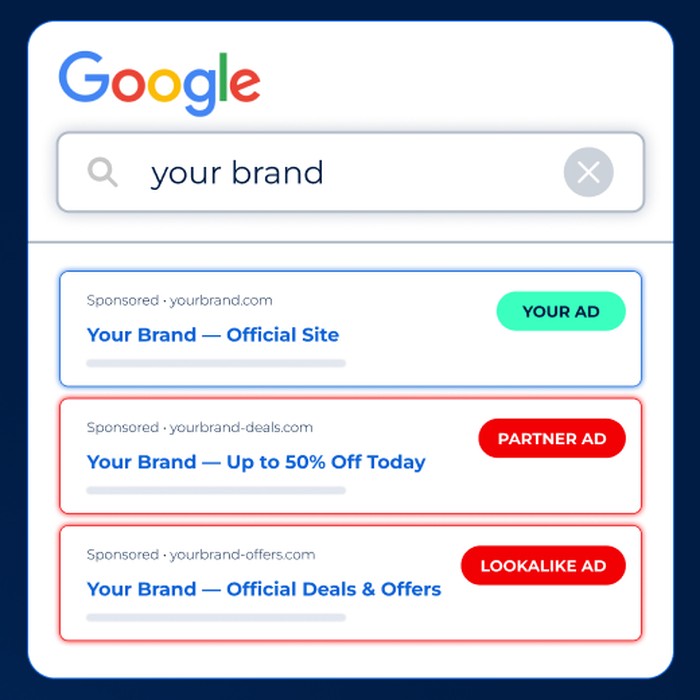
Now add paid search ads to the picture. If the same partner is running a Google Ads campaign on your brand name, it may also be competing with your own Search promotion for the people who already know where they want to shop. That can put pressure on branded CPCs, though an extra competitor doesn’t automatically mean every click becomes more expensive.
Not all coupon affiliates do this, and brand bidding isn’t automatically a violation. The problem starts when paid-search activity or coupon misuse breaks the rules you’ve set for your partner program. Especially during a sale when traffic, commissions and ad spend all rise at once.
Bluepear catches affiliates and competitors bidding on your brand before they cut into your margins. You get saved ads, screenshots, and click paths across markets, devices, and times, giving you the evidence you need to confront partners.
G2 Leader in Brand Protection (Fall 2026).
Free trial, no card needed.
Why this matters before November 27
Adobe forecasts $12.9 billion in U.S. online sales for Black Friday 2026. It expects discounts of up to 21% just before Thanksgiving and up to 30% during Cyber Week. Adobe also projects a 12% gain in the share of revenue attributed to affiliates and partners, compared with 4% for paid search. Within affiliate traffic, cashback and rewards partners account for the largest share, at 36%.
Those figures show why the affiliate channel deserves attention when promotions are everywhere.
Shopping for codes also starts before Black Friday. In its review of the 2025 shopping season, affiliate network Awin found that sales involving a voucher were running above the previous year’s level in the weeks leading up to November 23. Importantly, Awin was counting sales involving a voucher, not just sales attributed to coupon publishers.
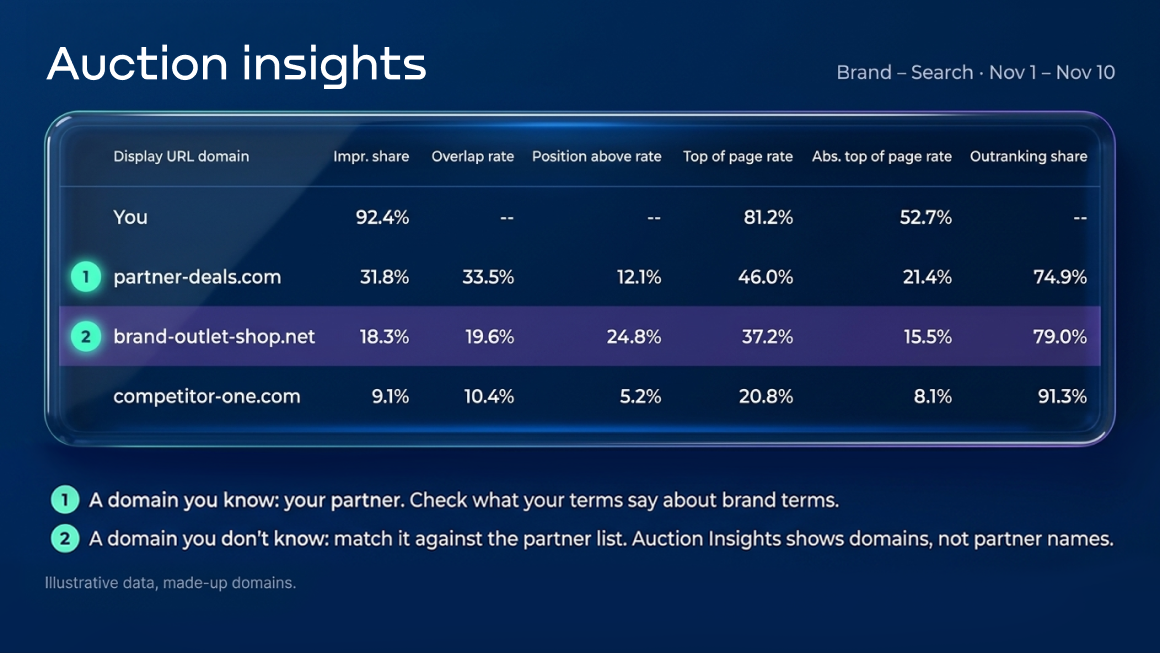
For a PPC manager, first signs of trouble may show up in the form of a lower Search impression share, a new domain in Auction Insights, or a change in branded CPC. For an affiliate manager, it may show up as a spike in commissions. None of those numbers proves misconduct on its own. A new promotion, budget constraint, bid change, or stronger competition can produce similar results.
Are your branded Search ads actually earning their keep?
It’s tempting to treat every commission on a branded search as wasted money. The research doesn’t support that shortcut.
In September 2025, measurement company Haus published an analysis of its branded-search experiments. Among brands facing high competition (at least three competitors with more than 50% combined impression share), 82% recorded positive incremental lift under Haus’s measurement threshold. The figure was 35% for brands facing low competition. Despite higher CPCs, the high-competition group also had 47% higher incremental return on ad spend on average.
An earlier study by Andrey Simonov and Shawndra Hill, published in Marketing Science in 2021, examined competitive ads on brand searches using Bing data. Competitors captured around 1 to 2% of the focal brand’s traffic when its ad held the top paid position, versus 6 to 15% when that position was removed.
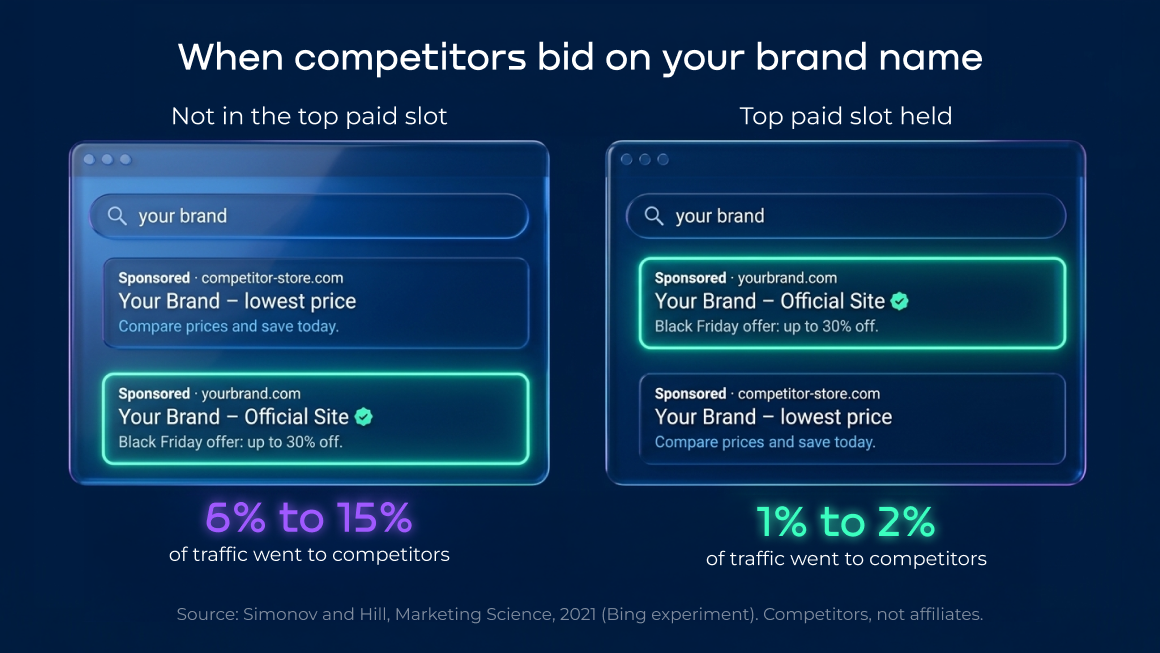
Neither study measured coupon affiliate abuse. But they make one point worth remembering: the value of branded search depends in part on what else appears in the auction. If you want to know whether your own spending is incremental, you’ll need to take action rather than viewing an attribution report.
First, make sure your own campaigns are ready
A Google documentation update this month adds another reason to check brand coverage. As PPC News Feed reported on November 2, Google’s updated guidance says Performance Max may filter out navigational or brand-related queries in favor of dedicated Search campaigns. That’s a possibility, not a promise that every branded query will be routed to Search. Google recommends giving those campaigns enough budget and eligible, high-quality ads.
Before the sale, we recommend doing these three checks:
- Make your own offer easy to find. Search for your brand with coupon, promo code, discount and Black Friday. If you’re running a legitimate offer, make sure your ad and promotion assets reflect it. Don’t leave customers guessing whether an unfamiliar coupon page has the best deal.
- Check which campaign can serve on brand queries. Review the relevant keywords, budgets and ad eligibility in your Search campaign. Google offers brand inclusions for Search and brand exclusions for Search and Performance Max. Verify how you’ve configured them rather than assuming Performance Max will handle the handoff.
- Watch branded impression share and auction changes. Compare Search impression share and Search top impression share with your normal baseline. If they fall, check budget, bidding, targeting and ad eligibility before blaming a new competitor.
🔍 Want the full picture on brand bidding costs?
Read how brand bidding affects e-commerce PPC performance, from branded CPC to incrementality tests.
Then check what your partners are allowed to do
Coupon sites, cashback publishers and browser extensions can all be part of an incentive-based affiliate program, but they don’t necessarily operate the same way. Some bring first-time customers. Others help hesitant shoppers convert. The issue is whether their activity follows your program’s terms and whether you’re paying for value you actually received.
Start with the paid-search rules. Do they prohibit bidding on the brand name? Misspellings? Terms such as brand + coupon? Do partners have to add those terms as negative keywords? Are approved resellers or specific affiliates exempt? If the rules don’t say, there may be nothing to enforce until you’ve clarified them.
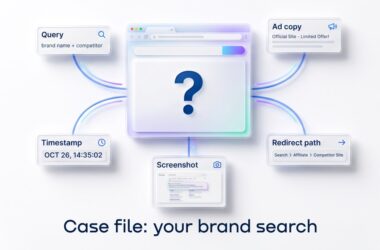
Next, look at the ads. An affiliate ad that resembles yours may confuse customers even if it comes from a recognized partner. Save the headline, description, displayed URL, landing page and the time and location where the ad appeared. Follow the redirects where possible, and ask the affiliate team to match the destination or affiliate ID to a publisher.
Finally, check the codes themselves. Search for your brand alongside code, voucher and discount. Are coupon pages showing expired offers as active? Has a subscriber-only code reached a public site? Are partners promoting a discount they weren’t authorized to share? A code appearing on a coupon page is worth investigating, not automatic proof of fraud. Compare it with the codes you’ve actually issued and the permissions attached to each one.
Google’s trademark policy is another reason to keep the distinctions clear. Google generally doesn’t restrict trademarks used as keywords or in the second-level domain of a display URL. It may restrict certain uses of trademarks in ad text following a complaint, including misleading uses and uses by direct competitors. Your affiliate agreement is a separate matter: a practice can be permitted by Google and still breach the terms of your program.
What a search for “brand + coupon” might reveal
You don’t need to decide whether every result is good or bad immediately. You need to know what you’re looking at.
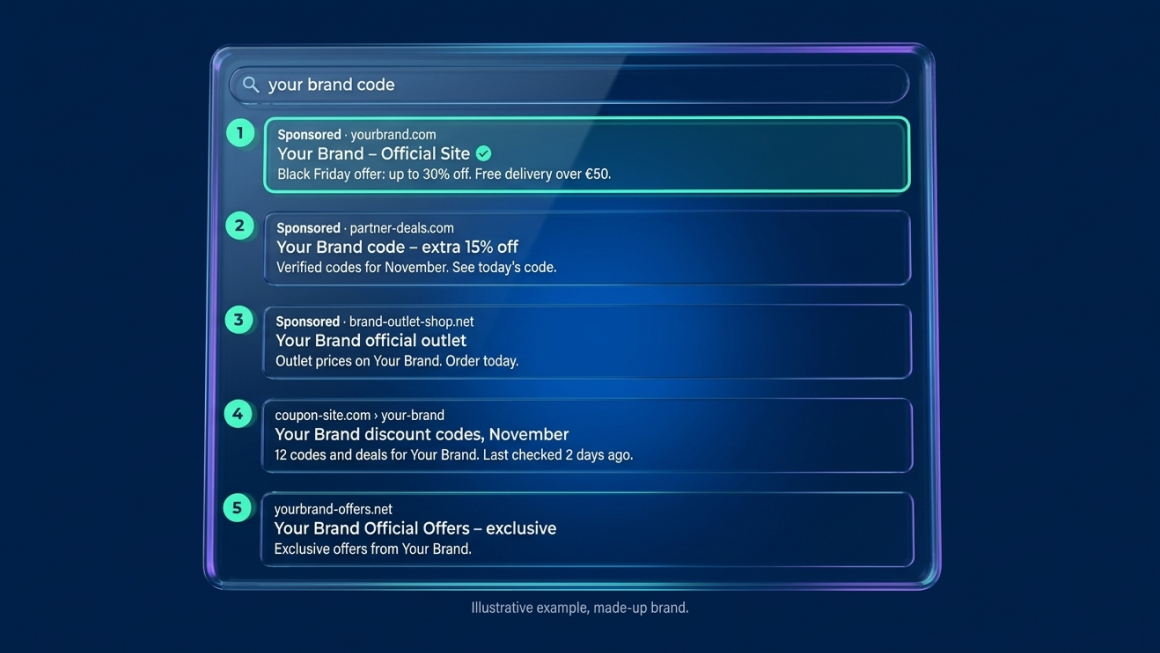
| What you see | What it might be | What to check |
|---|---|---|
| Your own paid ad | Your brand campaign | Does it show the current offer? |
| An ad from a familiar domain | An approved reseller or affiliate | Is paid search on branded terms allowed under its agreement? |
| An ad from an unfamiliar domain | A competitor, affiliate or unrelated advertiser | Save the ad and landing page; check the redirects and partner list. |
| An organic coupon result | A coupon publisher or aggregator | Are the codes genuine, current and authorized for public use? |
| A page copying your name or promotion | An affiliate, competitor or impersonator | Check the displayed and final URLs, page content and the advertiser’s identity. |
A single screenshot can establish that an ad appeared. It can’t establish how often it ran, whether a sale was incremental or, by itself, which affiliate was behind it.
Why checking Google once isn’t enough
A search from your office on Tuesday morning shows what was available to that location and device at that moment. Advertisers can target different countries, cities, schedules and devices. Google also allows up to 500 IP-address exclusions per campaign, alongside account-level exclusions. That doesn’t mean a partner is deliberately hiding an ad; it means a second person repeating your search may see something different.
That’s what made the problem difficult for Otrium, a European fashion outlet platform operating across seven markets. Its affiliate team suspected that some partners were bidding on branded keywords, but manual checks weren’t consistently capturing the activity.
According to Bluepear’s published account of the case, six affiliates were identified during the first 3 months of monitoring. Roughly half had already raised suspicions; the others hadn’t been on the team’s radar. During February to April 2026, Otrium identified 4,835 non-compliant transactions and avoided €40,842 in affiliate commissions.
Those savings were commissions the company did not pay, not measured savings on Google Ads clicks. The case doesn’t tell us how many of those shoppers would have purchased without the affiliates. What it does show is the value of collecting records that a team can actually use to challenge non-compliant payouts.
🛒 Is your tracking ready for peak traffic too?
Run through the Black Friday checklist for PPC tracking and test your consent setup before the sale.
What to do between now and Black Friday
There are only a few days left, so keep the work manageable.
This week: Check your main branded queries in the markets you care about, on mobile and desktop and at different times of day. For anything suspicious, record the keyword, location, device, local time, ad copy, displayed URL, landing page and redirect path. Pull Auction Insights for your brand campaigns, but read it correctly: overlap rate and position-above rate describe auctions where your ads participated. They don’t identify an affiliate or show every ad that ran when yours was absent.
Before November 27: Sit down with the affiliate manager. Agree on the list of approved paid-search partners, confirm which codes can be published, and identify who can pause a publisher or dispute a payout during the promotion. Fix any gaps in your own brand campaign at the same time.
During the sale: Keep checking impression share, CPCs and auction changes against your baseline. If something looks wrong, verify the actual ad and compare it with the program rules before taking action.
When automated monitoring makes sense
If you’re managing one brand in one market, a disciplined manual review may be enough to get started. Checking many countries, devices and times of day is another matter.
Tools built for paid-search monitoring can repeat those checks and preserve what appears. Bluepear monitors selected branded queries from different locations and devices throughout the day. It collects search-result and landing-page screenshots, ad copy and redirect information, and can surface affiliate identifiers when they’re available. Its coupon-code monitoring also helps teams investigate unauthorized offers. Records and alerts give PPC and affiliate teams something concrete to review together.
Monitoring won’t answer every commercial question. It can show where an ad appeared and provide evidence of a potential rule breach. It can’t, on its own, prove that a partner added no incremental sales or that a particular ad caused CPCs to rise. Those questions need attribution analysis and, ideally, controlled testing.
If you’d rather find out what’s happening before the sale than piece it together afterward, Bluepear offers a seven-day free trial with no credit card required.
Bluepear catches affiliates and competitors bidding on your brand before they cut into your margins. You get saved ads, screenshots, and click paths across markets, devices, and times, giving you the evidence you need to confront partners.
G2 Leader in Brand Protection (Fall 2026).
Free trial, no card needed.
Two quick questions
Possibly. The answer depends on competition, margins and what happens when your ad isn’t there. Haus’s findings suggest brand ads are more likely to create measurable incremental value under stronger competitive pressure. Start by reviewing Auction Insights, then test if the decision is material to your budget.
You can prohibit or limit brand bidding in your affiliate-program terms and take action under those terms when you have evidence of a breach. Google’s trademark policy is different: bidding on a trademark as a keyword isn’t, by itself, prohibited by that policy. Make the partner rules explicit before you need to enforce them.

Hana Kobzová is a freelance PPC specialist and the founder of PPC News Feed. Named among the TOP 100 Most Influential PPC Experts 2026, she is also a Google Ads Product Expert and a Microsoft Advertising Certified Professional. Hana delivers clear updates and actionable insights that help marketers save time and work smarter.